Tuesday, 19 March 2019

Zoho Mail SMTP Settings

Zoho Mail SMTP Settings

You can use your Zoho email account on devices like phones and computers to connect with the native email app.

Use these settings to set up the incoming mail server information for your Zoho Mail account:

Inbound Servers:

Type Server Address Port
POP Server (SSL) pop.zoho.com 995
IMAP Server (SSL) imap.zoho.com 993

Outbound Servers:

Type Server Address Port
SMTP Server (SSL) smtp.zoho.com 465

Yahoo SMTP Settings

Yahoo SMTP Settings

You can use your Yahoo email account on devices like phones and computers to connect with the native email app.

Use these settings to set up the incoming mail server information for your Yahoo Mail account:

Inbound Servers:

Type Server Address Port
POP Server (SSL) pop.mail.yahoo.com 995
IMAP Server (SSL) imap.mail.yahoo.com 993

Outbound Servers:

Type Server Address Port
SMTP Server (SSL) smtp.mail.yahoo.com 465, 587

Hushmail SMTP Settings

Hushmail SMTP Settings

You can use your Hushmail email account on devices like phones and computers to connect with the native email app.

Use these settings to set up the incoming mail server information for your Hushmail Mail account:

Inbound Servers:

Type Server Address Port
POP Server (SSL) pop.hushmail.com 995
IMAP Server (SSL) imap.hushmail.com 993

Outbound Servers:

Type Server Address Port
SMTP Server (SSL) smtp.hushmail.com 465, 587

Tuesday, 18 September 2018

How to view Email Headers

How to view Email Headers

If you have to report spam to a support department or to a abuse team, you likely also need to provide the full message headers from a message. This may also be needed by a support technician in order to troubleshoot email delivery problems.

Every email sent over the internet is made up of two parts the header and the message body of the email. Every single email you send or receive on the Internet contains an Internet Header, a full and valid email header provides a detailed log of the network path taken by the message between the mail sender and the receiver email server.

Your email client program will usually hide the full header or display only lines, such as From, To, Date, and Subject, see below for more information on pulling headers for your email client:

Microsoft Outlook (2013/2016/2019)

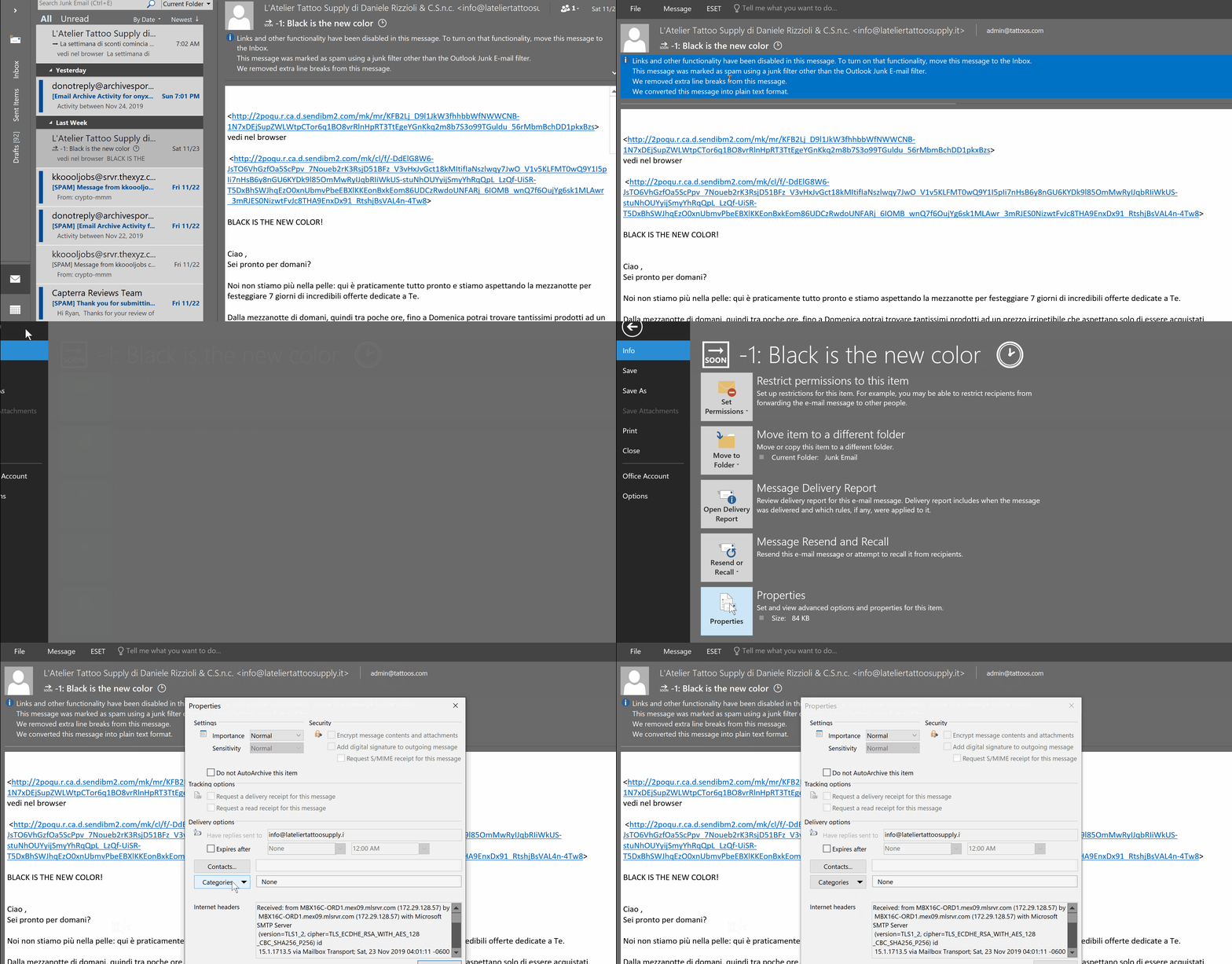
  1. Double-click the email message to display it in its own full window.
  2. Select “File” > “Properties“.
  3. The Properties window is displayed. View the message header in the “Internet headers” field at the bottom of the window.
Outlook Web App

  1. If you’re using Outlook Web Access, you can select the three dots (…) located at the upper-right corner while in the message, then choose “View Message details“.

Gmail

  • Open the message you’d like to view headers for.
  • Click the down arrow next to Reply, at the top-right of the message pane.
  • Select Show original.

Yahoo

  • Go to Options > General Preferences
  • Under Mail Viewing Preferences, go to Message Headers, then select ALL.
  • Hit the small down arrow next to Forward and choose As Inline Text.

Thexyz

To view the full message headers of an email, you can login to webmail and select or highlight the email you wish to view the headers for.

  1. Double-click the email to open it in a separate window.
  2. You can then click More drop-down.
  3. Click the View Full Header link, located in the upper right corner of the window. To hide the header, click the Hide Header link.

Thursday, 30 August 2018

List of email services no longer in operation

List of email services no longer in operation

A list of 81 email services that are no longer operational as email services.

  1. 30Gigs.com
  2. boardermail.com
  3. comic.com
  4. consultant.com
  5. contractor.net
  6. coolsite.net
  7. counsellor.com
  8. dallasmail.com
  9. deliveryman.com
  10. didamail.com
  11. dr.com
  12. doctor.com
  13. englandmail.com
  14. cutey.com
  15. cyber-wizard.com
  16. cyberdude.com
  17. cybergal.com
  18. dallasmail.com
  19. dbzmail.com
  20. deliveryman.com
  21. diplomats.com
  22. disciples.com
  23. discofan.com
  24. disposable.com
  25. dispostable.com
  26. doctor.com
  27. engineer.com
  28. englandmail.com
  29. europe.com
  30. europemail.com
  31. execs.com
  32. execs.com
  33. exemail.com.au
  34. fastermail.com
  35. financier.com
  36. fireman.net
  37. flashmail.com
  38. gardener.com
  39. geologist.com
  40. germanymail.com
  41. graduate.org
  42. graffiti.net
  43. graphic-designer.com
  44. greenmail.net
  45. groupmail.com
  46. guerillamail.com
  47. h-mail.us
  48. hackermail.com
  49. hairdresser.net
  50. hilarious.com
  51. hiphopfan.com
  52. homemail.com
  53. hot-shot.com
  54. housemail.com
  55. humanoid.net
  56. financier.com
  57. fireman.net
  58. flashmail.com
  59. hotpop.com
  60. iname.com
  61. innocent.com
  62. inorbit.com
  63. instruction.com
  64. instructor.net
  65. insurer.com
  66. internetemails.net
  67. internetmailing.net
  68. internode.on.net
  69. iprimus.com.au
  70. irelandmail.com
  71. israelmail.com
  72. italymail.com
  73. jetemail.net
  74. job4u.com
  75. journalist.com
  76. justemail.net
  77. keromail.com
  78. kissfans.com
  79. litepost.com
  80. sacmail.com
  81. tormail.org

Sunday, 10 June 2018

List of privacy focused email providers

List of privacy focused email providers
  • ProtonMail – Achieves secure encryption by only allowing Webmail access.
  • Hushmail.com – Canadian provider been around since 1999.
  • Thexyz – Another secure and private Canadian provider with 10+ year history.
  • Tutanota – German email provider focused on privacy.
  • RiseUp.net – Another RoundCube service.
  • ShazzleMail – Free POP email access.
  • StartMail.com – IMAP compatible Dutch email provider.
  • Autistici/Inventati – A more complex but private email service.
  • NeoMailBox.com – Unlimited aliases, SSL and OpenPGP encryption.
  • 4SecureMail.com – Send secure mail to any email addresswith RSA SSL encryption.
  • CounterMail.com – Designed to provide maximum security and privacy without any unnecessary complexity.
  • S-Mail.com – Messages are encrypted and decrypted through PGP, SSL and DSA algorithms on the user’s PC
  • Securenym.net – SecureNym now supports both PGP and S/mime server-side encryption.
  • Safe-Mail.net – Only accepts messages from other Safe-mail.net users and from those in Address Book.
  • Novo-Ordo.com – Sub Rosa Secure Email is a division of Epiphyte LLC with a mail box in Nevada, USA.
  • LockBin.com – Lockbin protects messages in transit with 256-bit TLS/SSL.
  • SendINC.com – Sends encrypted emails, not actually a provider.
  • Opolis.eu – Opolis Secure Mail is owned by privately-held PI Technology Co WLL.
  • OneShar.es – Self destructing emails.
  • BitMessage.ch – Send up to 500 emails per day with this free service.
  • Lavabit – Shut down as of August 2013 after Edward Snowden was found using the service and the FBI tried to gain access to encryption keys.
  • SilentCircle.com – Email service shut down as of August 2013. All of their other services still work.
  • TorMail.org – Tor-based email service now dead after FBI server seizure.

Thursday, 7 June 2018

List of email providers that support email forwarding

List of email providers that support email forwarding

While email forwarding a fairly simple function for an email provider to offer, it is not always supported. Some providers like Yahoo and Facebook have discontinued email forwarding to make it more difficult for users to leave and use another service.

Here is a list of email providers that support email forwarding:

Here is a list of email providers that DO NOT support email forwarding:

  • Protonmail
  • Yahoo
  • Facebook