Tuesday, 24 September 2019

List of temporary email address services

List of temporary email address services

In a time when email spam has become an everyday nuisance, and when identity theft threatens, a disposable email address  can serve as a convenient tool for protecting Internet users. These services offer a free email alias service that forwards to your existing email address.

Email service Remains active Notes
maildrop.cc Permanently No sign up required
grouplist.io Permanently No sign up required
20minutemail.com 20 minutes No SSL
spamgourmet.com Permanently Open source
trashmail.com Custom Additional features available
yopmail.com 8 days No SSL or sign up required
boun.cr Permanently No sign up required

Monday, 19 August 2019

Tuesday, 19 March 2019

Zoho Mail SMTP Settings

Zoho Mail SMTP Settings

You can use your Zoho email account on devices like phones and computers to connect with the native email app.

Use these settings to set up the incoming mail server information for your Zoho Mail account:

Inbound Servers:

Type Server Address Port
POP Server (SSL) pop.zoho.com 995
IMAP Server (SSL) imap.zoho.com 993

Outbound Servers:

Type Server Address Port
SMTP Server (SSL) smtp.zoho.com 465

Yahoo SMTP Settings

Yahoo SMTP Settings

You can use your Yahoo email account on devices like phones and computers to connect with the native email app.

Use these settings to set up the incoming mail server information for your Yahoo Mail account:

Inbound Servers:

Type Server Address Port
POP Server (SSL) pop.mail.yahoo.com 995
IMAP Server (SSL) imap.mail.yahoo.com 993

Outbound Servers:

Type Server Address Port
SMTP Server (SSL) smtp.mail.yahoo.com 465, 587

Hushmail SMTP Settings

Hushmail SMTP Settings

You can use your Hushmail email account on devices like phones and computers to connect with the native email app.

Use these settings to set up the incoming mail server information for your Hushmail Mail account:

Inbound Servers:

Type Server Address Port
POP Server (SSL) pop.hushmail.com 995
IMAP Server (SSL) imap.hushmail.com 993

Outbound Servers:

Type Server Address Port
SMTP Server (SSL) smtp.hushmail.com 465, 587

Tuesday, 18 September 2018

How to view Email Headers

How to view Email Headers

If you have to report spam to a support department or to a abuse team, you likely also need to provide the full message headers from a message. This may also be needed by a support technician in order to troubleshoot email delivery problems.

Every email sent over the internet is made up of two parts the header and the message body of the email. Every single email you send or receive on the Internet contains an Internet Header, a full and valid email header provides a detailed log of the network path taken by the message between the mail sender and the receiver email server.

Your email client program will usually hide the full header or display only lines, such as From, To, Date, and Subject, see below for more information on pulling headers for your email client:

Microsoft Outlook (2013/2016/2019)

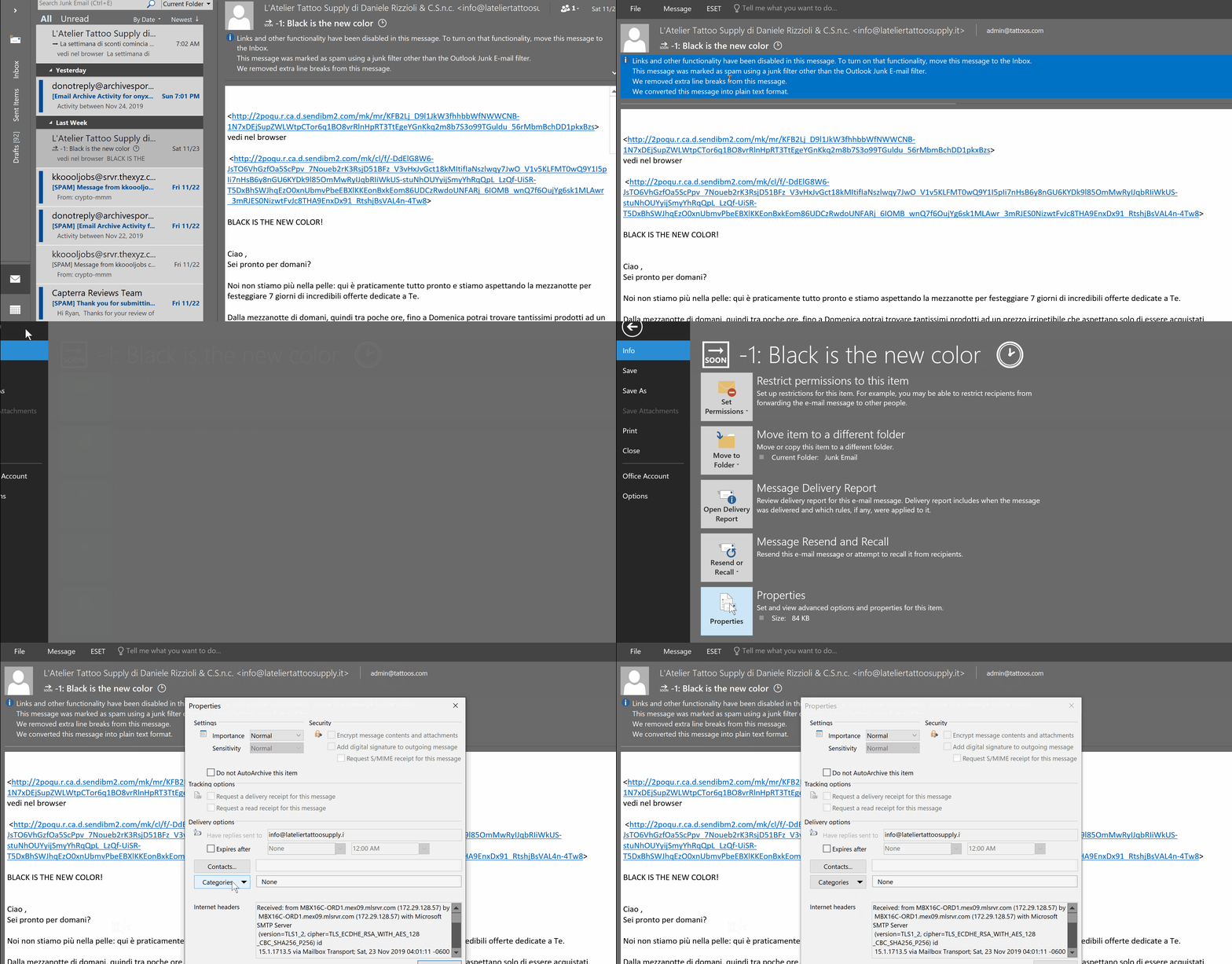
  1. Double-click the email message to display it in its own full window.
  2. Select “File” > “Properties“.
  3. The Properties window is displayed. View the message header in the “Internet headers” field at the bottom of the window.
Outlook Web App

  1. If you’re using Outlook Web Access, you can select the three dots (…) located at the upper-right corner while in the message, then choose “View Message details“.

Gmail

  • Open the message you’d like to view headers for.
  • Click the down arrow next to Reply, at the top-right of the message pane.
  • Select Show original.

Yahoo

  • Go to Options > General Preferences
  • Under Mail Viewing Preferences, go to Message Headers, then select ALL.
  • Hit the small down arrow next to Forward and choose As Inline Text.

Thexyz

To view the full message headers of an email, you can login to webmail and select or highlight the email you wish to view the headers for.

  1. Double-click the email to open it in a separate window.
  2. You can then click More drop-down.
  3. Click the View Full Header link, located in the upper right corner of the window. To hide the header, click the Hide Header link.

Thursday, 30 August 2018

List of email services no longer in operation

List of email services no longer in operation

A list of 81 email services that are no longer operational as email services.

  1. 30Gigs.com
  2. boardermail.com
  3. comic.com
  4. consultant.com
  5. contractor.net
  6. coolsite.net
  7. counsellor.com
  8. dallasmail.com
  9. deliveryman.com
  10. didamail.com
  11. dr.com
  12. doctor.com
  13. englandmail.com
  14. cutey.com
  15. cyber-wizard.com
  16. cyberdude.com
  17. cybergal.com
  18. dallasmail.com
  19. dbzmail.com
  20. deliveryman.com
  21. diplomats.com
  22. disciples.com
  23. discofan.com
  24. disposable.com
  25. dispostable.com
  26. doctor.com
  27. engineer.com
  28. englandmail.com
  29. europe.com
  30. europemail.com
  31. execs.com
  32. execs.com
  33. exemail.com.au
  34. fastermail.com
  35. financier.com
  36. fireman.net
  37. flashmail.com
  38. gardener.com
  39. geologist.com
  40. germanymail.com
  41. graduate.org
  42. graffiti.net
  43. graphic-designer.com
  44. greenmail.net
  45. groupmail.com
  46. guerillamail.com
  47. h-mail.us
  48. hackermail.com
  49. hairdresser.net
  50. hilarious.com
  51. hiphopfan.com
  52. homemail.com
  53. hot-shot.com
  54. housemail.com
  55. humanoid.net
  56. financier.com
  57. fireman.net
  58. flashmail.com
  59. hotpop.com
  60. iname.com
  61. innocent.com
  62. inorbit.com
  63. instruction.com
  64. instructor.net
  65. insurer.com
  66. internetemails.net
  67. internetmailing.net
  68. internode.on.net
  69. iprimus.com.au
  70. irelandmail.com
  71. israelmail.com
  72. italymail.com
  73. jetemail.net
  74. job4u.com
  75. journalist.com
  76. justemail.net
  77. keromail.com
  78. kissfans.com
  79. litepost.com
  80. sacmail.com
  81. tormail.org